
In-home viewing on a dedicated screen with simple sharing between adults.
Complete field guide
Wi-Fi vs non-Wi-Fi baby monitor: which should I buy?
A local parent unit is the simpler default when viewing stays inside the home. Wi-Fi only makes sense when remote access is worth the account and network upkeep. Cord routing is a separate safety decision either way.
Accept account and network work when viewing away from home matters.
Placement, clearance, power, and the manual outrank camera angle and resolution.
Exact listings
What should you buy?
Buying through our Amazon links costs you nothing extra and helps us keep DadSetup free to read. As an Amazon Associate we earn from qualifying purchases.
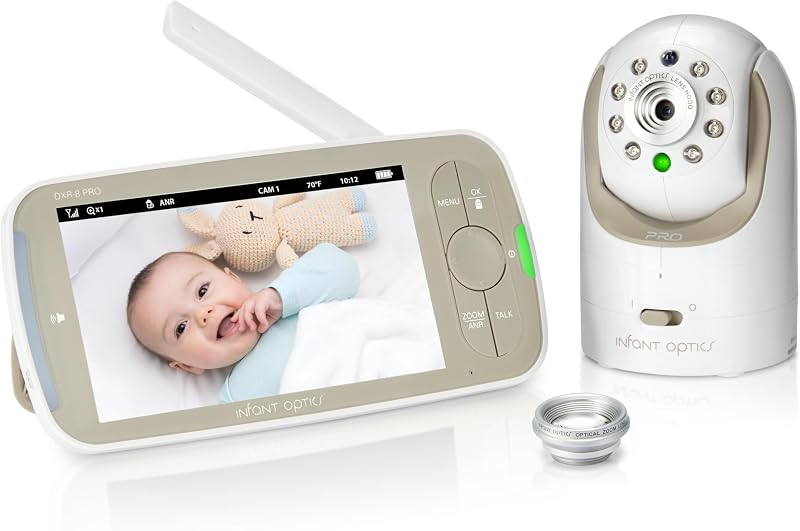
Model DXR-8 PRO / Amazon affiliate link
Infant Optics DXR-8 PRO
- Choose it when: in-home viewing should stay on a dedicated screen without a Wi-Fi account, app, or router dependency.
- Published spec: 5-inch 1280 by 720 monitor, FHSS local link, pan and tilt, two-way audio, night vision, Active Noise Reduction, a replaceable monitor battery, and pairing for up to four cameras.
- Lens fit: the optical zoom lens is included; the wide-angle lens is sold separately. The DXR-8 PRO SS is the separate split-screen model.
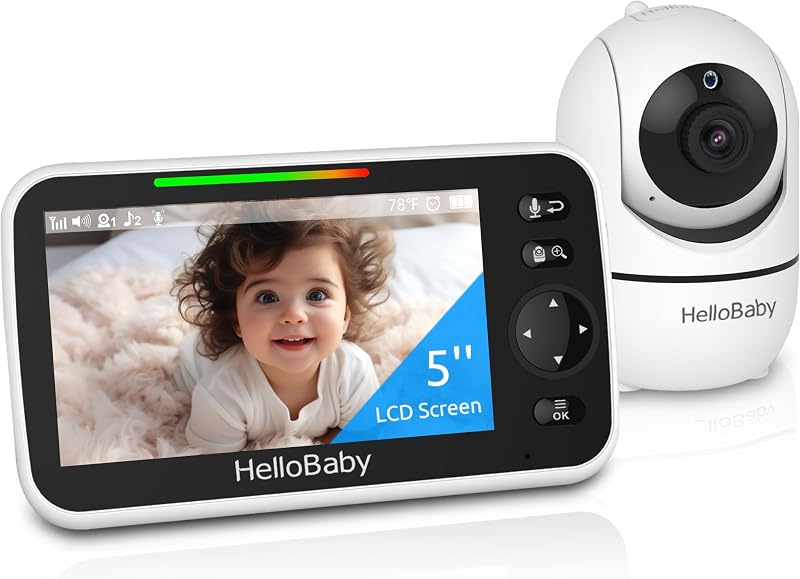
HB6550 / Amazon affiliate link
HelloBaby HB6550 5-Inch Non-Wi-Fi Baby Monitor
- Choose it when: you want a local 5-inch screen, pan-tilt-zoom camera, and no Wi-Fi account or router dependency.
- Published spec: 2.4 GHz FHSS connection, infrared night vision, VOX/ECO screen wake, and support for up to four cameras with scan mode. Confirm the package configuration and controls in the manual.
- Tradeoff: the manufacturer lists VOX/ECO screen wake; that is separate from Infant Optics' Active Noise Reduction feature.
Weighing a local monitor with ANR against one with split-screen viewing? Compare Infant Optics DXR-8 PRO vs. HelloBaby HB6550 on noise handling, lens options, and two-room setups.
Path chooser
Which path sounds like your situation?
Local parent unitDedicated screen, no accountIn-home viewing on a charged monitor. Radio range, camera power, and the three-foot cord route still decide whether it works.See the access table
Wi-Fi cameraRemote view, ongoing upkeepApp, router, credentials, and access removal become part of the purchase. Cord distance does not go away.See the privacy work
Non-Wi-Fi optionInfant Optics DXR-8 PROTwo local parent-unit choices with different noise and multi-camera features.See the product card
The access decision
Do I need Wi-Fi for a baby monitor at home?
| Decision factor | Local parent unit | Wi-Fi camera |
|---|---|---|
| Useful view | Inside the home on a dedicated screen. | Inside or away from home on an approved connected device. |
| Dependencies | Camera power, monitor charge, radio range, and the included hardware. | Camera power, home network, app, cloud service, account, and phone. |
| Sharing | Keep the charged monitor in one labelled home. Pass the screen, not a login. | Invite, permission, account, and device access all need a clear owner. |
| Cord route | CPSC: keep cords and monitor parts at least three feet from babies and young children. | The same three-foot rule. Remote viewing does not shorten a power cable. |
| Privacy work | No remote account to administer. Follow the system manual and physical-access plan. | Unique credentials, updates, multifactor authentication when available, and access review. |
| Failure plan | Charge the monitor and check the stated range from the actual room. | Check power, Wi-Fi, app login, service status, phone battery, and remote access permissions. |
The lower-upkeep path is the one with fewer dependencies for the view you actually need. Neither system is a medical device or a replacement for adult supervision.
What should I look for in a baby monitor without Wi-Fi?
Local radio link, a charged parent unit with a labeled sharing path, usable range through your actual walls and floors, cord routing at least three feet from the sleep space, and camera power that matches the room layout. Pick access before comparing camera specs.
Nursery sound and multiple rooms
How do nursery white-noise machines and two-room setups change the pick?
If the nursery uses a sound machine or fan, ongoing background noise may affect what you hear. Infant Optics says its Active Noise Reduction filters background noise such as fans. HelloBaby HB6550 lists VOX/ECO screen wake; this turns the display off and wakes it when sound meets the configured sensitivity, which is separate from an audio noise filter.
| Nursery constraint | Infant Optics DXR-8 PRO | HelloBaby HB6550 |
|---|---|---|
| Fan or sound-machine noise | Active Noise Reduction filters background noise, including fans. | No ANR feature is listed; VOX/ECO changes screen behavior when sound meets its sensitivity setting. |
| Zoom and placement | Optical zoom lens included; wide-angle lens sold separately. | Remote pan, tilt, and zoom; follow the manual for camera placement and controls. |
| More than one room | Pairs with up to four cameras and scans between views; split-screen is the separate DXR-8 PRO SS model. | Supports up to four cameras with scan mode; confirm the package and manual for the selected configuration. |
| Parent-unit battery | Replaceable battery compartment; follow the manual for charging. | Rechargeable parent unit; check the manual for charging behavior. |
| Cord distance | Keep the camera cord at least three feet from the sleep space. | The same CPSC three-foot cord rule applies. |
Camera choice does not change cord placement. Keep cords and monitor parts at least three feet from babies and young children.
No-buy
When should you skip buying a new baby camera?
Keep the monitor you already use when in-home viewing, range, and cord routing still work. Skip Wi-Fi when remote access is not a recurring requirement. Skip any setup that trades a better angle for a cord closer than three feet to the sleep space.
Placement
Place the camera and charge the screen
CPSC warns that baby-monitor cords have strangled children. Keep cords and monitor parts at least three feet from babies and young children, and follow the exact manual for mounting, power, and cord-management hardware. A common failure is a dangling adapter plus a dead parent unit with no labeled charging home.
- Measure from the sleep space.Keep the camera at least three feet from the crib before choosing the outlet, shelf, wall, or mount.
- Route the complete cable.Secure the full run. Remove loops, slack, dangling adapters, and paths a child can pull toward the sleep space.
- Park the charged monitor.Give the parent unit one charging home the next adult can find in the dark. A local screen only works if it is charged and easy to find.
- Test the real room.Check picture, audio, night vision, pan and tilt, and signal from the place the next caregiver will sit.
- Recheck after every room change.Move the cord plan when the crib, furniture, camera, or reachable area changes.
Connected-camera setup
Remote access needs ongoing maintenance
Wi-Fi viewing adds an account and connected devices. Check how the model handles updates, sign-ins, and sharing before you choose.
- Update the camera, app, phone, and home router before regular use.
- Use a unique password. Turn on multifactor authentication when the service supports it.
- Review every person, device, and permission with access.
- Turn off remote-management and sharing features the household does not need.
- Remove access after a caregiver, phone, service account, or household arrangement changes.
Read next
What should I read next?
FAQ
Common questions about baby monitors
Wi-Fi vs non-Wi-Fi baby monitor: which should I buy?
Choose local when the view stays inside the home and a dedicated screen is easier to hand off. Choose Wi-Fi when remote access or deliberate multi-person sharing justifies account, app, router, and permission upkeep.
Do I need Wi-Fi for a baby monitor at home?
No when in-home viewing on a dedicated screen is enough. Wi-Fi only earns the extra setup when viewing away from home or deliberate remote sharing is a real requirement.
What should I look for in a baby monitor without Wi-Fi?
Local radio link, charged parent-unit sharing, range through your actual home, cord routing at least three feet from the sleep space, and camera power that matches the room.