
Two included cameras and a 5.5-inch Full HD split-screen display.
Baby cameras / local monitors
Babysense PRO vs. HelloBaby HB6550 for split-screen viewing
Choose Babysense PRO when you need a confirmed side-by-side view from its two included cameras. HelloBaby supports up to four cameras, but its listing does not explain how multiple feeds appear.
Remote pan and tilt, 2x zoom, and support for up to four cameras.
Two cameras, a 5-inch 720p display, and split-screen viewing.
Three monitor listings
How does each model show camera feeds?
Babysense PRO lists two included cameras on a split screen. HelloBaby lists pan, tilt, 2x zoom, and support for up to four cameras, but not how multiple feeds appear. The 5-inch Babysense HD also lists a two-camera split screen.
Buying through our Amazon links costs you nothing extra and helps us keep DadSetup free to read. As an Amazon Associate we earn from qualifying purchases.

Babysense PRO / Amazon affiliate link
Babysense PRO
Fits: seeing two camera feeds together on a split-screen parent unit.
Published specs: 5.5-inch Full HD display, two cameras included and expandable to four, non-Wi-Fi FHSS connection, up to 20 hours in Eco Mode, six-color night light, and white noise.
Tradeoff: the listing leaves audio selection unclear when two feeds appear together. Check the manual if that matters.
View on Amazon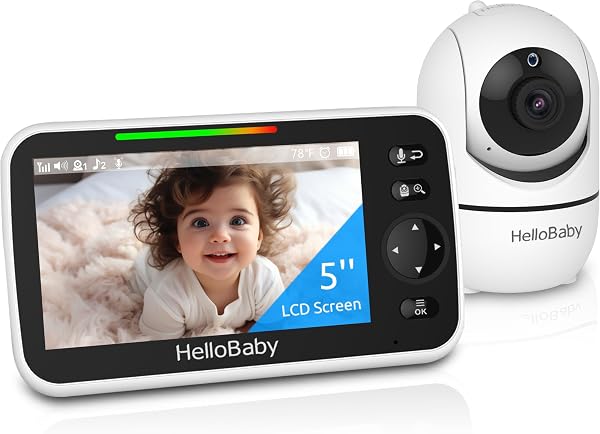
HelloBaby HB6550 / Amazon affiliate link
HelloBaby HB6550
Fits: adjusting the camera view from the parent unit with pan, tilt, and zoom.
Published specs: 5-inch screen, non-Wi-Fi 2.4 GHz FHSS connection, infrared night vision, two-way audio, room-temperature monitor and alert, 2x zoom, and expansion to four cameras.
Tradeoff: the listing leaves multi-camera display behavior unclear. Confirm the setup in the manual if two-room viewing matters.
View on Amazon
Babysense HD S2 / Amazon affiliate link
Babysense 5-inch HD split-screen monitor
Fits: a 5-inch split-screen setup with two cameras included.
Published specs: 5-inch 720p HD display, non-Wi-Fi connection, remote pan and tilt, up to 4x zoom, white noise, and built-in night light.
Tradeoff: the listing says audio focuses on one camera at a time and SCAN alternates audio between cameras every 15 seconds.
View on AmazonChoose by screen layout
How many views do you need together?
Two views togetherChoose Babysense PROIts 5.5-inch Full HD screen lists split-screen viewing and includes two cameras.Compare the displays
Move the camera remotelyConsider HelloBabyThe listing includes pan, tilt, and 2x zoom; verify how added cameras display.Check camera controls
5-inch split-screenCompare Babysense HDA 5-inch 720p screen with two cameras included and audio scan between cameras.See the companion listing
Local monitor comparison
Which features change the view?
| Decision factor | Babysense PRO | HelloBaby HB6550 | Babysense 5-inch HD |
|---|---|---|---|
| Connection | Non-Wi-Fi FHSS. | Non-Wi-Fi 2.4 GHz FHSS. | Non-Wi-Fi FHSS. |
| Parent-unit display | 5.5-inch Full HD split screen. | 5-inch screen; multi-camera display behavior is unclear from the listing. | 5-inch 720p HD split screen. |
| Cameras | Two included; expandable to four. | Supports up to four; included camera count is not specified in the supplied facts. | Two included; listing says up to four can connect. |
| Multi-camera view and audio | Two feeds appear together; audio selection is unclear from the listing. | Multi-camera display and audio behavior are unclear from the listing. | Split-screen; audio focuses on one camera, with SCAN audio switching every 15 seconds. |
| Camera movement | Two adjustable cameras included. | Remote pan and tilt with 2x zoom. | Remote pan and tilt with up to 4x zoom. |
| Sound and lighting | Six-color night light and white noise. | Infrared night vision, two-way audio, and a room-temperature alert. | Night light, white noise, two-way audio, and programmed lullabies. |
| Battery or power mode | Up to 20 hours in Eco Mode. | Audio-only power-saving mode; no battery runtime is stated in the supplied facts. | 4000 mAh battery and sound-activated power-saving mode; no runtime is stated. |
A camera limit does not tell you whether feeds appear together or which camera supplies audio. Check the manual, then test the view and sound in the rooms where you plan to use it.
No-buy
When should you keep your current monitor?
Keep a working local monitor when the picture, audio, charging routine, and room coverage meet your needs. Replace it only for a specific gap, such as needing a split-screen display for two rooms.
Setup and handoff
What should you confirm when setting up the cameras?
- Route the cord first.Keep the power cord at least three feet from any part of the crib, bassinet, play yard, or other safe sleep environment. Follow the CPSC alert and the manufacturer's mounting instructions.
- Pair the exact cameras.Follow the model's manual for camera pairing. Confirm how the parent unit displays additional cameras and which camera supplies audio.
- Test the room layout.Check picture, sound, and signal from the places where the next caregiver will use the parent unit.
- Choose one charging home.Park the parent unit where the next adult can find it and return it after use.
Read next
More camera setup guides
FAQ
Common questions about Babysense and HelloBaby monitors
Which monitor confirms a side-by-side two-camera view?
The Babysense PRO listing describes two included cameras and a 5.5-inch Full HD split screen. The 5-inch Babysense HD listing also describes split-screen viewing with two included cameras.
How many cameras can HelloBaby HB6550 pair?
Its listing confirms support for up to four cameras and remote pan and tilt with 2x zoom, but leaves multi-camera display behavior unclear.
What does the Babysense PRO add over the 5-inch HD model?
It lists a 5.5-inch Full HD split-screen display, up to 20 hours in Eco Mode, and a six-color night light. The 5-inch model lists a 5-inch 720p display and 4x zoom.
What should I confirm before installing two cameras?
Check the exact manual for pairing, display behavior, sound selection, mounting, and cord routing. Keep the power cord at least three feet from the sleep space.